Your personal 24/7 real estate AI assistant.
Ask Kiwi to find homes, run CMA, and write offers for you.

working for top 1% teams in California
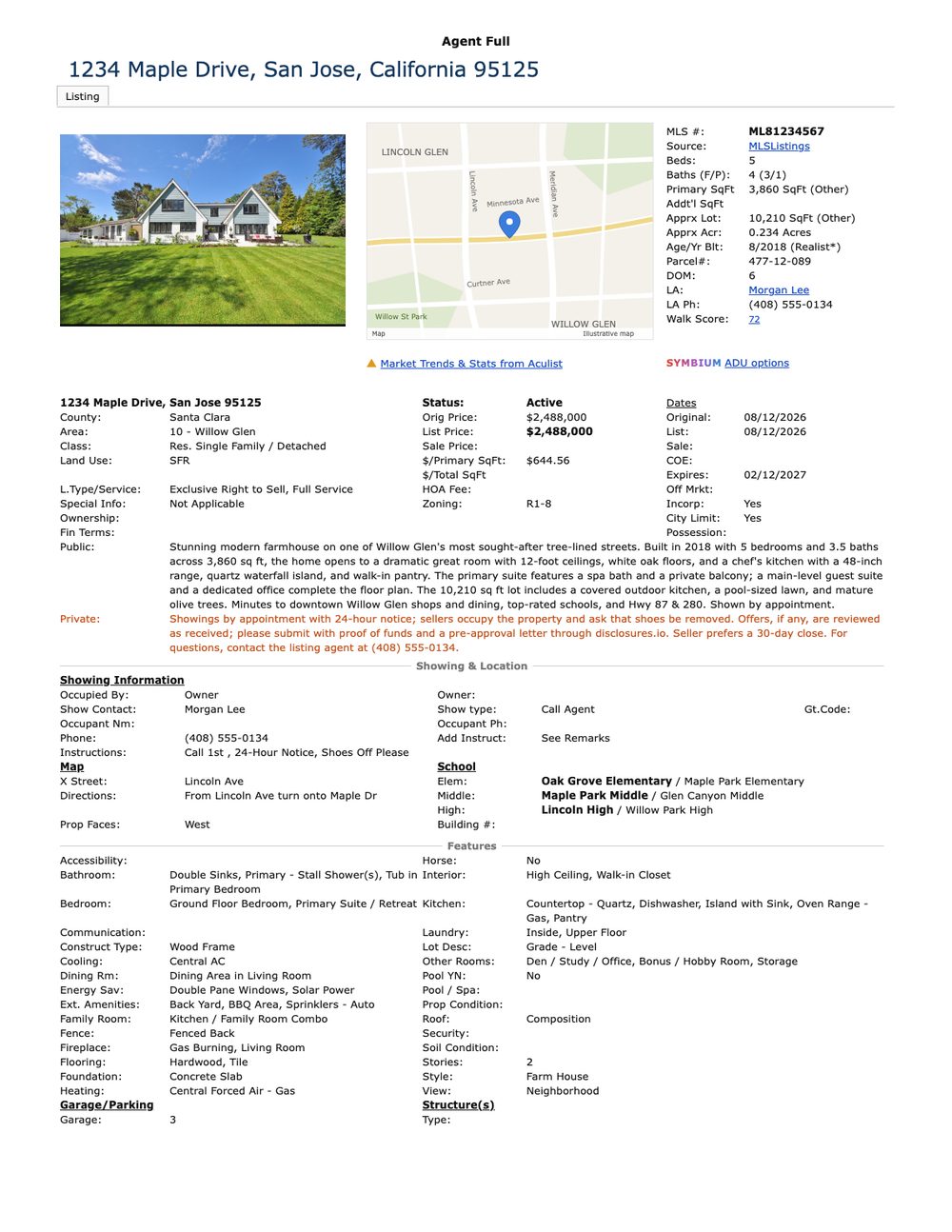 Full MLS report · 1234 Maple Drback in about a minuteopen ↗

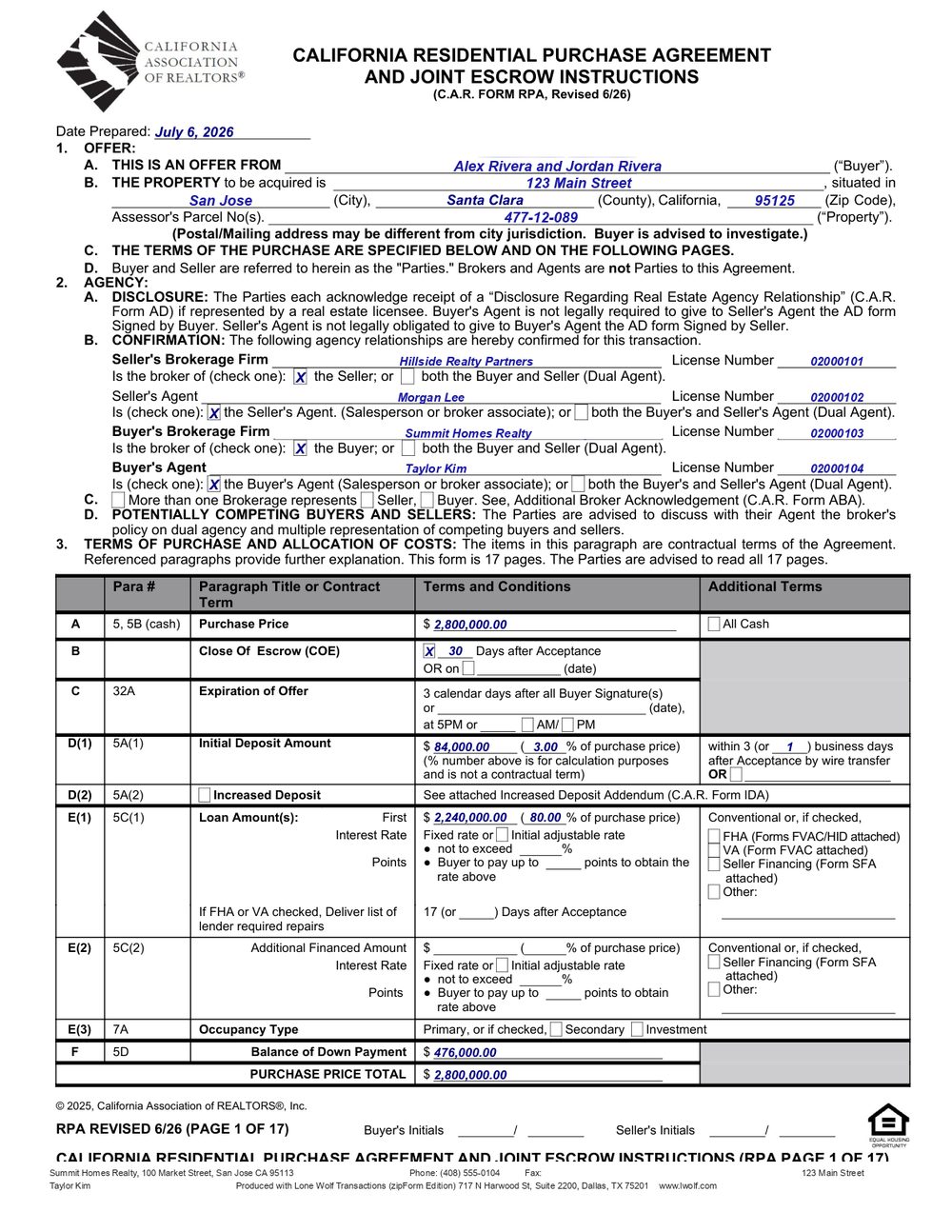 Purchase agreement · 123 Main St17 pages · filled in the real form · ready for your reviewopen ↗
Real work Kiwi does for top 1% Keller Williams teams, shown here with sample names and addresses. You approve everything before it reaches a client.
Watch Kiwi work in WeChat
Start with Agent Full and Gmail. Add deeper workflows when you need them.
Your Kiwi plan includes WeChat or WhatsApp, Gmail, and MLS Agent Full. Every workflow below is included at that price: transactions, forms, e-sign, CMA, disclosures, and the team workflows. Setup is guided, one workflow at a time, so tell us which one matters most and we start there. The bigger plans run these same workflows, set up for your whole team.
Writes your offers
The full purchase agreement (price, deposit, loan, contingencies), drafted for your review in minutes. Counters and addenda too.
Sets up e-sign for you
Signers added, every Sign Here and date box on its line. Ready for you to review and send.
Finds homes for your buyers
Tell Kiwi what a buyer wants. Fresh matches and price drops land in your chat every morning, client-ready to forward.
Researches any property
Drop an address, get the full MLS report back in about a minute, plus the title profile and history when you want the whole picture.
CMAs, your way
Comps chosen by your own rules: same area, similar size, the right mix of active, pending and sold.
Plans your broker tour
Stops in driving order, the tour sheet to match, and every home's full report sent automatically once you approve the route.
Brings you leads
Expired listings pulled every day into a lead sheet, so you're the first call.
Edits your listing photos
Send the raw shoot. Every photo comes back edited like a pro: brightened, straightened, skies deepened, clutter removed. MLS-ready by morning.
Disclosure & listing packages
Disclosure packages built on your template; CMA, title and history bundled for the listing appointment.
Client emails in your voice
Follow-ups and updates drafted the way you write them. You read, you send.
Creates your listing flyers
Polished marketing flyers for your listings, with the property details, your contact information, and your brokerage logo. Ready to print or share.
English or Chinese, text or voice
Send a voice note in either language. Kiwi understands and gets to work.
Correct Kiwi once. It's done your way from then on.
Kiwi starts with the playbook of a top-producing team and keeps learning yours: how you like a CMA, an offer, an email to a client. Tell Kiwi once, and that's how it comes back on every deal after.
The longer you work together, the more Kiwi knows: your comp rules, your contingencies, your tone with clients. Kiwi never forgets, and Kiwi never has to be told twice.
The questions agents ask before they start.
What is the difference between Kiwi Lite and Kiwi Max?
Kiwi Lite is for one agent working one-on-one with Kiwi, and you set it up yourself on your own dedicated Mac. Our team does not do the setup or onboarding for you, and Kiwi Lite is sold as is. Kiwi Max gives the best experience for one to three people* in one shared workspace and comes with hassle-free setup: we provide and run the dedicated computer and get everything connected with you, for a one-time setup fee. We also have many individual agents using Kiwi Max Plan due to its flexibility, speed, and convenience.
What is Kiwi Max Plan?
Kiwi Max is a shared virtual office for you and your assistants or cooperating teammates. It includes one private one-on-one admin chat with Kiwi and one designated shared team group, best for one to three people*, including the owner. Use the one-on-one admin chat for administrative things: setup, billing, people, and anything about the workspace itself. Do the work in the Kiwi Assistant group chat. It is the more capable of the two, and it stays that way even when you are the only person in it.
How many people are included in Kiwi Max?
Kiwi Max works best for one to three people*, including the owner, working in one shared team group.
Is Kiwi just a virtual assistant?
Kiwi is much better than any virtual assistant because Kiwi brings the expertise of a real estate agent to the work. Kiwi has been trained specifically for real estate and can guide you through questions about a home and help with the work a real estate agent actually needs to do. Kiwi is like having a top 1% real estate agent by your side. That expertise shows up when Kiwi is asked difficult agent questions. Here are examples from demos and customer requests:
- In a demo, Kiwi was asked whether a room could accommodate an expansion. Kiwi found the floor plan and used it to investigate the question. Kiwi found that the room was too small and that the proposed addition was not appropriate, while an ADU could be a possible alternative.
- In another case, Kiwi noticed that a property had a pool and community amenities but no HOA. That combination seemed unusual, so Kiwi flagged it for the agent to look into.
- A client asked about a school’s track record of sending students to Stanford, including how many students went there. We trained Kiwi specifically for real estate questions like this. In that example, Kiwi produced a better result than ChatGPT: Kiwi found the answer, while ChatGPT could not find the same information.
- Another customer wanted to find north-facing homes, or only south-facing homes, within a particular county. Kiwi could work with that specific request and find homes based on the direction they faced.
- Kiwi also found leads in response to another client’s request.
- Kiwi also helped filter out poor-quality homes when a client specifically asked Kiwi to do so. The search reflected what that client wanted, including which homes to exclude.
It would be incredibly difficult to find any virtual assistant who could match Kiwi’s real estate expertise and accommodate the same range of real estate work.
Which group can I add Kiwi to?
We help you choose or create one designated shared team group during onboarding. Keep Kiwi's team work in that group. Kiwi Max does not include adding Kiwi to client chats, property or deal groups, or additional team groups. Bring requests about those clients or properties into your shared team group.
Can cooperating agents work with Kiwi in the same group?
Yes. Your team members, including the owner, can work with Kiwi in the same shared group. Kiwi Max works best for one to three people*. Cooperating agents can request help with their own work using the accounts arranged during onboarding. Kiwi Max is for you and your assistants or cooperating team, not agents who need to keep competing work separate.
Can each person use their own email and MLS login?
Yes. Members of the same team group can use their own email and MLS accounts. During onboarding, identify who owns each account and work with Kiwi and our team to connect the authorized logins. Kiwi uses the requesting member's configured account and can ask for clarification when the person or account is unclear.
How do we organize different team members' work in one group?
Use the shared team group as your virtual office. Kiwi identifies the team member, property or client, and task in each request. Tell Kiwi about shared team preferences and any instructions specific to a member's work. This is one workspace for people who cooperate and share work.
Is the private admin chat a separate confidential workspace?
The admin has a private one-on-one chat with Kiwi for setting up and managing the same team workspace. It is not a separate confidential office for an individual agent. Work that needs to be kept separate from other team members belongs in a separate Kiwi Max plan and workspace.
Can agents competing for the same property share one Kiwi workspace?
No. Agents competing for the same property should each have their own Kiwi Max plan and workspace. Sharing one virtual office is inappropriate for competing offers or confidential client work that must be kept separate between agents. The private admin chat is part of the same team workspace and does not provide that separation.
Can we define what Kiwi should learn globally (for example, our offer-writing standards, CMA methodology, disclosure process, and communication style) while keeping competing agents’ deal-specific information private?
Kiwi Max is a shared virtual office for you and your assistants or cooperating teammates. It includes one private one-on-one admin chat with Kiwi and one designated shared team group, best for one to three people*, including the owner. Within the workspace, it is an open space for the team to collaborate. As Kiwi works with your team, skills are learned, shared, and improved to match your team’s preferences. Anything that must be kept private from other team members should be left out of Kiwi’s workspace. Just as two competing agents would not collaborate openly in the same room, they should not do so in the same Kiwi group chat.
Is my workspace shared with other Kiwi customers?
Each Kiwi Max plan has its own workspace and designated team group, with the accounts configured for that team. Your team works together in that workspace. Other customer teams use their own workspaces.
How long does setup take?
Plan for 3–5 business days after purchase for us to source, receive, and set up your equipment. Business days are Monday through Friday, excluding holidays. If equipment or account access needs more time, the Kiwi team will discuss the next steps with you.
What is the one-time setup fee required for Kiwi Max?
This covers the equipment and infrastructure we set up for you: a dedicated workspace computer, a dedicated phone, a dedicated phone number, and a dedicated Kiwi WeChat account. We set these up for you so you don't have to worry about anything, just as if you hired an assistant and we took care of the basic onboarding for you.
Do I need a computer or phone just for Kiwi?
For Kiwi Lite, install Kiwi for Mac on a dedicated Mac (Apple chip, M1 or newer) used only for Kiwi. For WeChat, also provide a separate assistant phone and assistant WeChat account. With Kiwi Max, we provide and maintain the dedicated equipment.
How will my work accounts be connected?
We will guide you through the access needed for the work you want Kiwi to do. Inside the app portal, you may fill out your account information for faster onboarding.
Is Kiwi usage unlimited?
No. Kiwi is designed for normal day-to-day team work with a generous plan allowance, but plan limits and the usage rules in the Terms apply. A long or complex task can use more of your allowance than a short request. Check Usage in the Kiwi app for your current allowance, and contact us if you expect unusually heavy use.
What if I send Kiwi lots of long, difficult tasks or messages very quickly?
Kiwi is designed to work like a real human assistant on a dedicated computer. Kiwi will be able to answer all your questions, but Kiwi may need the appropriate amount of time to do so. Just like a human assistant, Kiwi cannot handle too many tasks at the exact same time, especially when they involve deep research. This situation is rare, but Kiwi will not miss your requests. Kiwi will still need time to work through them for your team.
Can Kiwi learn how our team likes to work?
Kiwi is an extremely intelligent assistant that learns your team's preferences and working style naturally as you work together over time. You can also tell Kiwi directly how you like things done, from your preferred tone and format to the way your team handles a task.
My team uses region-specific software (for example, a region-specific MLS in Seattle or Texas). How does Kiwi use it?
Kiwi is already well trained as a high-level real estate agent, giving Kiwi a strong foundation for real estate tasks. For your specific needs, simply tell Kiwi how to use your area's software, just as you would train your assistant. Kiwi should be able to learn and adapt to your team's region-specific tools.
Can Kiwi learn a new website or workflow?
Try asking Kiwi directly in your workspace. Explain what you want to accomplish and walk Kiwi through the basic steps using accounts you are authorized to access. Kiwi can do new work with your guidance, and you should review the result. Website restrictions, permissions, and task complexity can limit what works; support for every website or task is not guaranteed.
I need help getting a custom workflow or action to work. What should I do?
Kiwi Advisory provides additional support for custom workflows and actions. Contact our team to discuss what you need. We can review your request and discuss how Kiwi Advisory can help on a case-by-case basis.
Does my plan include custom software development?
Kiwi Max covers using Kiwi's available capabilities and getting your workspace set up. It does not promise custom software development. Kiwi Advisory provides additional advisory support, and you can ask us to review workflow or capability requests. We discuss feasibility, scope, and any timing separately before making a commitment.
Will my clients know an assistant is involved?
Only if you tell them. Kiwi drafts; you approve and send. Emails come out in your voice, and nothing reaches a client without you.
What if Kiwi gets something wrong?
You'll catch it before anyone else sees it: every document comes back as a draft for your review. Correct it once, and Kiwi does it your way from then on.
Do I need to learn new software?
No. Kiwi works in WeChat or WhatsApp, the chat app you already use. Connect your desired tools (e.g. Gmail, MLS, Title, ZipForm), and Kiwi can use them automatically in Kiwi’s work.
Is this just ChatGPT?
No. Chatbots only generate text. Kiwi connects to Gmail and runs Agent Full in the real MLS, then returns the result in your chat. Forms, e-sign and the other completed workflows are included and added through guided setup.
Does Kiwi replace my assistant or transaction coordinator?
Kiwi takes the busywork (reports, drafts, packages, follow-ups) around the clock, including nights and weekends. Your people keep the relationships and the decisions.
Does Kiwi work outside California?
Yes. Kiwi is not limited to California. Kiwi follows your MLS: Kiwi works with your own MLS login, so Kiwi can work wherever you have an MLS account.
Can I cancel?
Anytime, in one click. Your data is yours to export or delete.
I have more questions. Where can I ask?
Creating an account is free. Create a Kiwi account to open the detailed FAQs in your app portal. You'll find answers about onboarding, privacy, and how to use Kiwi, plus what happens after purchase. If your question is still unanswered, use Help & support to contact the Kiwi team.
Refer an agent. You both get a credit.
Every new agent you refer who subscribes gets an additional generous subscription credit, and so do you. No limit. Your referral link is on the Refer & save tab in your Kiwi app once signed in.
Limited time. Lock the promotional price for a full year.
Kiwi Lite
$899
$499/month
Price valid for a full year
Kiwi Max
$2,629
$1,999/month
Price valid for a full year
LIMITED-KIWI
Limited time · limited seats
Enter promo code at checkout. The promotional price then holds for 12 months, and your plan continues at our website normal pricing (at time of purchase).
Kiwi Lite
$899 /month
$8,990 /year
Limited time. Price may rise at any time.
2 months free: works out to $749/month, billed once a year.
The full product for one agent: WeChat or WhatsApp, Gmail, MLS Agent Full, and the full transaction work. The app walks you through setup step by step.
Before you buy: Kiwi Lite needs a dedicated Mac used only for Kiwi, with Kiwi for Mac installed. For WeChat, also provide a separate assistant phone and assistant WeChat account. See what you need.
Self-service: you set Kiwi up yourself on your own Mac. Our team does not do the setup or onboarding for you, and Kiwi Lite is sold as is.
Get startedcancel anytimeno setup fee on your own Macsecure Stripe checkout
Not ready yet? Leave your email and we'll keep you posted.
Kiwi Max
$3,499 $2,629 /month
$34,990 $26,290 /year
Limited time. Price may rise at any time.
Highly recommended for speed and performance
2 months free: works out to $2,190/month, billed once a year.
Your virtual office with Kiwi: one private admin chat and one shared team group, best for one to three people*, including the owner.
One-time setup fee required. It covers onboarding with our team to get everything set up and connected.
Get startedcancel anytimeonboarding with our teamsecure Stripe checkout
Kiwi Advisory
$5,499 /month
$54,990 /year
Everything in Kiwi Max, plus a weekly 1:1 with the top 1% California team behind Kiwi. Deal strategy, team operations, and workflows built around how you already work.
Join the waitlistno cardwe email you when a seat opens
- What happens after you sign up
- ✓Start your workspace. Free, about two minutes. Pick how you want Kiwi set up.
- ✓Pick your plan. Stripe checkout; Kiwi never sees your card.
- ✓Install Kiwi for Mac. Then connect WeChat or WhatsApp.
- ✓Connect Gmail and your work apps. Then send your first request.
Compare plans
| What you get | Lite$899/monthLimited time. Price may rise at any time.Lightweight, for individual setups | Team |
Advisory$5,499/monthSold out · waitlist openWeekly 1:1 with the top 1% team behind Kiwi |
|---|---|---|---|
| Message Kiwi | WeChat · WhatsApp | WeChat · WhatsApp | WeChat · WhatsApp |
| MLS Agent Full | Included | Included | Included |
| Gmail | Read, summarize, draft, and follow up | Read, summarize, draft, and follow up | Read, summarize, draft, and follow up |
| MLS, forms & disclosures | Full transaction work | Full transaction work | Full transaction work |
| Social media | Not included | Video editing, social media posting, and social media management | Video editing, video management, social media posting, and social media management |
| Usage and team size | Individual use, for one agent, only 1:1 with Kiwi | Best experience for 1-3 people* | Larger teams, with the highest usage limits |
| Active chats | 1 | One dedicated one-on-one admin chat plus one shared workspace group chat for your team, including the owner | Higher limits on a case-by-case basis |
| Setup | Bring your own device | Hassle-free setup with onboarding, one-time setup fee required | Hassle-free setup and onboarding included |
| Your team's playbook | Kiwi learns from your corrections | One shared playbook, every agent | Built with you, then kept current |
| Support | Not included | Email, next business day | Your whole team, priority |
| Phone calling | Not included | Not included | Available as an add-on |
| Advisory | Not included | Not included | Weekly private 1:1 |
Each plan includes usage limits sized for its team.
Kiwi Advisory is sold out. Leave your email and we will reach out when a seat opens.
Get your evenings back.
Start Kiwi: everything included, cancel anytime. Sign up, connect WeChat or WhatsApp, then Gmail, and send your first request.
Not ready to start? Leave your email below and pick Keep me posted. Waiting on Kiwi Advisory? Same form, and we'll tell you when a seat opens.
Nothing reaches a client without you
Kiwi drafts; you approve and send. No auto-send, ever.
Your logins stay yours
Stored encrypted, never shown again, never shared with another team.
Leave anytime
Cancel in a click. Export or delete your data whenever you want.